OpBill is an integrated function into our FREE mobile app – OpAlert.
OpAlert is designed to find extra lucrative private surgical lists, all from the convenience of your mobile phone. Surgeons use it to find themselves surgical assistants at the touch of the button!
Step 1
Download OpAlert from your ios or android app store, and signup as a surgical assistant.


Step 2
Allow push notifications to ensure that you are kept up to date with new surgical lists that are posted.
Step 3
Activate OpBill
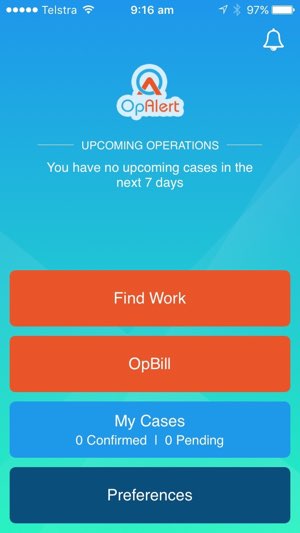
Once you have signed up to OpAlert, you will notice that there is a large “OpBill” button on the home screen.
Simply click on OpBill and you are 1 minute away from uploading your first case to be billed!
The OpBill function uses the information that has already been provided as part of the OpAlert Signup process so that only a select few details are required at this stage
Open OpAlert App

Take a Photo
- Provider Number(s)
Please provide us with any of your provider numbers. OpBill is able to search and find your remaining provider numbers and include them onto our system for future billing.
- Hospitals Accredited At
OpBill will preselect any hospitals that you have set during your signup process to OpAlert.
- Surgeons (if you are an assistant)
Please add any of your regular surgeons that you assist with. If they are already on the data base then their details will appear for you to select. If you are adding a new surgeon, please add one of their provider numbers, and OpBill will search and upload the remaining provider numbers for you!
You do NOT need to provide the specific Surgeon’s provider number of the hospital that you are completing the case in. Any of their provider numbers is sufficient, and OpAlert will do the rest.
- Favourite Item Numbers
This is a non compulsory section that allows you to add your most frequently used item numbers. Up to 5 (five) numbers can be added and allows for easy selection later at the time of uploading a case.

Adding a Case
You are now ready to add your first case! The beauty of OpAlert is the speed at which this can be done! All from the convenience of your mobile phone.
You will be prompted to take a photo of the hospital sticker. Then simply add the date of the case, hospital where the operation occurred, which surgeon the cases were with, and what item numbers you want to bill for. Click Upload, and the job is done!
Following the process of my case
Once the case is uploaded, you will be able to monitor the billing process through OpBill. As the case is processed, and then paid into your bank account, your case will transition between these categories on your phone.
If there are any errors with the details you have provided to us, we will let you know. You will receive an alert via your app, and in some cases, an email as well.
The future of medical billing is finally here
Download the OpAlert app to start billing with OpBill! Sign up, log in and you’re done!